

A 50-inch TV can look surprisingly large on a store display and much smaller once you picture it on your living-room wall. The reason is simple: the number on the box doesn’t describe the television’s width. It measures the screen diagonally, from one corner to the opposite corner.
That distinction matters when you’re choosing a TV stand, planning a wall mount, or checking whether a television will fit between two shelves. A few inches can make the difference between a comfortable fit and an awkward installation.
For a standard widescreen 50-inch television with a 16:9 aspect ratio, the screen measures approximately 43.6 inches wide and 24.5 inches tall. The full TV can be slightly larger because of its frame, and its overall height depends on whether the stand is attached.
A 50-inch TV screen equals 4 feet 2 inches diagonally, 127 centimeters, 1,270 millimeters, and 1.27 meters. Its screen width is about 3 feet 7.6 inches, making it roughly as wide as a small desk.
This guide covers the main 50 inch TV dimensions, useful conversions, everyday size comparisons, and practical ways to estimate the space you’ll need before buying one.
Every Unit a 50-Inch TV Measurement Converts To
The first thing to understand is that a 50-inch TV has several measurements, not just one. The 50-inch figure describes the diagonal of the display, while width and height describe the screen’s actual shape.
Here are the most useful conversions for understanding its size.
| Measurement | Approximate value |
|---|---|
| Screen diagonal in inches | 50 inches |
| Screen diagonal in feet | 4.17 feet, or 4 ft 2 in |
| Screen diagonal in centimeters | 127 cm |
| Screen diagonal in millimeters | 1,270 mm |
| Screen diagonal in meters | 1.27 m |
| Screen width for a 16:9 display | 43.6 inches |
| Screen width in feet and inches | 3 ft 7.6 in |
| Screen width in centimeters | 110.7 cm |
| Screen height for a 16:9 display | 24.5 inches |
| Screen height in feet and inches | 2 ft 0.5 in |
| Screen height in centimeters | 62.2 cm |
These width and height figures describe the viewable screen area, not necessarily the television’s outside dimensions. The bezel, rear housing, feet, and stand can increase the space required.
How the conversion works
Converting 50 inches into other units is straightforward:
- Inches to feet: Divide 50 by 12. The result is 4.17 feet, or 4 feet 2 inches.
- Inches to centimeters: Multiply 50 by 2.54 to get 127 cm.
- Inches to millimeters: Multiply 50 by 25.4 to get 1,270 mm.
- Inches to meters: Divide 127 cm by 100 to get 1.27 meters.
To estimate the screen width and height, use the standard 16:9 widescreen ratio. A 50-inch diagonal produces a screen roughly 43.6 inches wide and 24.5 inches high.
These are calculated screen measurements. Always check the manufacturer’s specifications for the exact width, height, depth, and stand dimensions of the model you’re considering.
Where a 50-Inch TV Fits on a Size Chart
A 50-inch television sits between many compact bedroom TVs and larger living-room displays. It can offer an immersive picture without taking over an entire wall.
To understand its place among common TV sizes, compare the screen dimensions below. All figures are approximate and assume a 16:9 aspect ratio.
| TV size (diagonal) | Screen width | Screen height |
|---|---|---|
| 32 inches | 27.9 in | 15.7 in |
| 40 inches | 34.9 in | 19.6 in |
| 43 inches | 37.5 in | 21.1 in |
| 50 inches | 43.6 in | 24.5 in |
| 55 inches | 47.9 in | 27.0 in |
| 65 inches | 56.7 in | 31.9 in |
| 75 inches | 65.4 in | 36.8 in |
Notice how a five-inch increase in diagonal size changes the overall width by more than four inches between a 50-inch and a 55-inch screen. That difference can matter when you’re working with a narrow TV cabinet or a fixed wall space.
A 50-inch model is often a practical choice for a medium-sized living room, a bedroom with enough viewing distance, or a multipurpose entertainment space. Whether it feels large or small depends on how far away you sit, the room layout, and your viewing preferences.
There isn’t one perfect room size for every 50-inch television. Screen resolution, content, personal comfort, and furniture placement all affect the experience.
12 Things That Help You Visualize a 50-Inch TV
The best way to picture a 50-inch TV is to separate its diagonal measurement from its width and height. The following comparisons focus on familiar objects and surfaces that help you imagine the screen’s footprint.
1. A Desk Around 44 Inches Wide
A desk measuring approximately 44 inches wide is a useful reference for the width of a 50-inch TV screen. Place the two measurements side by side in your mind: the screen would span nearly the entire width of the desk.
A desk this size may be used in a bedroom, study corner, or compact home office. Desk widths vary, so this is a comparison rather than a claim that every small desk has the same dimensions.
The important difference is depth. A TV screen is a tall, flat rectangle, while a desk extends much farther from front to back.
If you have a desk that’s close to 44 inches wide, its front edge can help you visualize the television’s screen width. The TV’s outer frame may extend a little beyond that measurement.

2. A 4-Foot Folding Table
A four-foot folding table measures 48 inches across its longer side, which is about 4.4 inches wider than a 50-inch TV screen’s estimated width.
That makes it a useful household comparison if you’ve ever set up a folding table for a family gathering, a garage sale, or extra workspace. The table is slightly wider than the screen, but the difference is small enough to picture easily.
Unlike a television, the table has a broad horizontal surface and usually stands on legs. A TV’s screen occupies much less depth, even though its front-facing width is similar.
Imagine placing the television across the back of the table. The screen would cover most of the table’s width, leaving a little room at each end if the widths were centered.

3. A Large Computer Monitor Setup
A 50-inch TV screen is much wider than a typical single computer monitor. Even a large desktop display generally occupies less horizontal space, although ultrawide monitors can come closer.
This comparison is useful if you’re familiar with a home-office monitor. A 50-inch screen can stretch across much of a desk setup, making the image feel more like a small home theater than a conventional computer display.
The exact comparison depends on the monitor’s diagonal size and aspect ratio. A 34-inch ultrawide display, for example, has a different shape from a standard 34-inch 16:9 screen.
Picture your current monitor centered on a desk, then imagine expanding the visible display to about 43.6 inches across. That’s the approximate width of a standard 50-inch TV screen.

4. A Small Two-Seat Sofa
Some compact two-seat sofas measure around 48 to 60 inches wide, depending on the armrests and design. A 50-inch TV’s screen width is therefore in the same general range as the narrower end of this furniture category.
This is a helpful comparison because sofas are familiar room-planning objects. If you can picture a small loveseat against a wall, you already have a rough sense of the horizontal space a TV screen may occupy.
Keep in mind that a sofa’s overall width includes the arms, while the screen measurement excludes the TV’s outer frame. The finished television may be a little wider than its calculated display area.
If you have a compact loveseat at home, compare the screen width with the sofa’s full front edge. The television may be similar in width, but its height is far smaller than the sofa’s back and seat combined.

5. A Standard Interior Door’s Width
Many standard interior doors are around 28 to 32 inches wide, although sizes vary by building and location. A 50-inch TV screen is substantially wider than one of these doors.
That makes a door a useful comparison for understanding the scale. If you’re used to seeing a roughly 30-inch-wide doorway, imagine adding about another 14 inches to its width to reach the screen’s approximate 43.6 inches.
A door is taller than a television screen, so the comparison works best when you’re looking at width rather than overall shape. The TV is a landscape rectangle, while a door is usually a portrait rectangle.
This comparison can also remind you to measure the route into the room. The television’s packaging may be much larger than the screen itself, and tight hallways or staircases can be a concern when delivering a new TV.

6. A Queen-Size Mattress
A standard US queen mattress is approximately 60 inches wide and 80 inches long. That makes it wider than a 50-inch TV screen by about 16.4 inches.
This is a good comparison if you’re familiar with the footprint of a queen bed. The TV’s width is a little under three-quarters of the mattress’s width, while the screen height is much smaller than either mattress dimension.
The mattress comparison is especially useful for visualizing furniture placement. A queen mattress covers a large rectangular area, while a television uses a narrow strip of wall space when mounted.
Imagine looking at the foot of a queen bed. The 50-inch screen would be narrower than the mattress, but not dramatically so. Remember that this comparison uses the screen width, not the diagonal measurement.

7. A 4-Foot Bookshelf
A bookshelf approximately 48 inches wide is just a little wider than a 50-inch TV’s estimated screen width. This makes it a particularly easy reference for someone furnishing a bedroom, office, or apartment.
The similarity is useful when checking whether a television will fit above a cabinet or shelf. However, the usable space depends on the furniture’s top panel, wall clearance, and the TV’s outside dimensions.
A bookshelf is typically much deeper than a thin television screen and may have a different footprint because of its side panels. If you’re planning to put a TV on top, you’ll need to check the stand’s base width and depth, not just the screen size.
If your bookshelf is about four feet wide, picture the TV screen spanning almost the same distance. Allow additional room for the television’s frame and any feet or stand.

8. A Large Whiteboard
A whiteboard around 4 feet wide is close to the width of a 50-inch TV screen. Many classroom and office whiteboards are sold in a range of sizes, so a four-foot-wide example is a useful reference rather than a universal standard.
The comparison is practical because both objects are typically mounted vertically against a wall and viewed from the front. That makes it easier to imagine how much horizontal wall space the TV will occupy.
The difference is that a whiteboard may be much taller than the television’s screen, depending on its dimensions. A 4-by-3-foot board, for instance, has a different shape from a 50-inch 16:9 display.
If you have access to a whiteboard or notice one in a classroom, imagine the TV covering a similar width but with a shorter, wider screen shape.

9. A 43-Inch Television
A 43-inch TV is a helpful comparison because it’s a common size category close to a 50-inch model. Its screen is approximately 37.5 inches wide and 21.1 inches tall, compared with around 43.6 inches wide and 24.5 inches tall for a 50-inch screen.
The larger screen adds about 6.1 inches of width and 3.4 inches of height. Those differences may sound modest, but they can make video, sports, and films feel more expansive from the same seating position.
This is also a useful shopping comparison. If you’re choosing between 43-inch and 50-inch models, measure the available width first rather than assuming the seven-inch diagonal difference means seven extra inches across.
Picture both screens mounted side by side. The 50-inch model would have a noticeably larger viewing area without being as wide as a 55-inch screen.

10. A 55-Inch Television
A 55-inch TV is slightly larger than a 50-inch model, with an approximate screen width of 47.9 inches and a height of 27 inches. Compared with the 50-inch screen, it adds roughly 4.4 inches in width and 2.5 inches in height.
This is a helpful reference when you’re trying to decide whether to move up to the next common screen size. The difference is visible, especially when the two displays are placed beside each other, but it doesn’t necessarily mean you need an entirely different room layout.
The outside dimensions of both TVs depend on their frames and designs. A slim-bezel model may have a different overall width from another TV with the same diagonal measurement.
If you already own a 55-inch television, imagine reducing the screen width by a little over four inches to picture a 50-inch model.
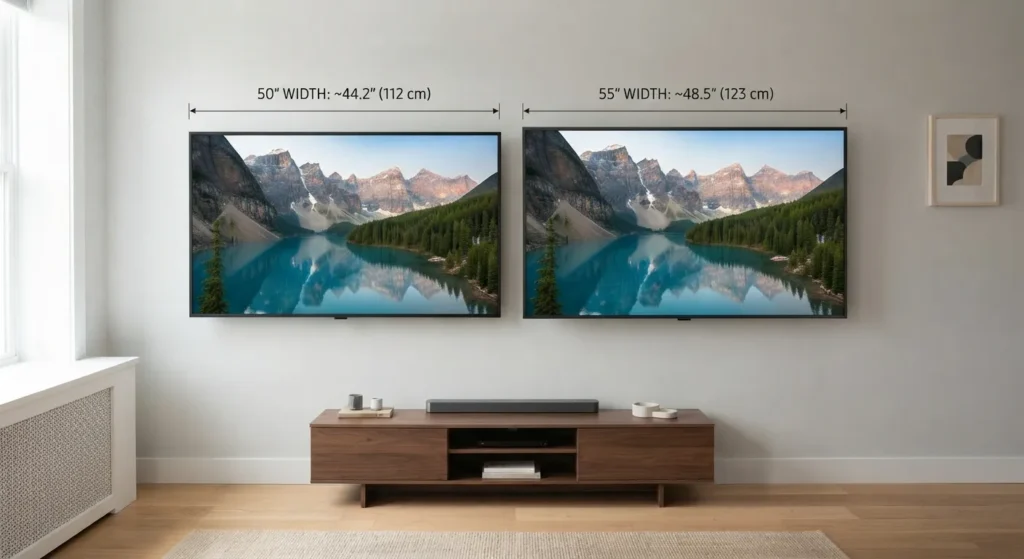
11. A 50-Inch TV’s Wall-Mount Area
A wall-mounted 50-inch television uses a screen area approximately 43.6 inches wide by 24.5 inches high. The required wall space should be larger than that to allow for the outer frame and any installation considerations.
This is one of the most relevant comparisons because the screen’s diagonal alone doesn’t tell you whether it will fit between cabinets, inside a wall recess, or above a fireplace. You need the specific model’s overall dimensions and the mount’s requirements.
The wall mount itself is usually attached to the back of the TV, so it doesn’t change the screen’s diagonal measurement. But it can affect how far the television sits from the wall and how easily cables can be connected.
For a practical visualization, mark a rectangle roughly 44 inches wide and 25 inches tall on paper or with removable painter’s tape. Then check the manufacturer’s outside dimensions before drilling or installing a mount.

12. A 50-Inch Television Box
The box used to transport a 50-inch television will normally be larger than the screen in at least some dimensions. It needs space for protective packaging, foam supports, and the TV’s outer frame.
That makes the carton a useful reference for delivery and storage. If you’re planning to carry the TV through a doorway or place it in a vehicle, the box dimensions may matter more than the screen dimensions.
There is no single universal box size for every 50-inch TV. Packaging changes according to the manufacturer, model, stand, and protective materials, so the safest option is to check the carton specifications for the exact product.
If you’re buying online, measure the delivery path and vehicle opening before the TV arrives. A television can fit comfortably on a wall while its packaging still presents a challenge in a narrow hallway.

The Screen Size Question People Actually Mean
When someone searches for 50 inch TV dimensions, they usually want to know one of three things: how wide the television is, how tall it is, or how much space it needs on a stand or wall.
How wide is a 50-inch TV?
A standard 16:9 50-inch TV has a screen width of approximately 43.6 inches (110.7 cm). The full television is usually a little wider once the frame is included, so check the manufacturer’s stated width before buying.
How tall is a 50-inch TV?
The screen itself is approximately 24.5 inches (62.2 cm) tall. With the frame included, the TV body will be slightly taller. If it’s sitting on a stand, the total height increases further.
Why is a 50-inch TV not 50 inches wide?
TV sizes are measured diagonally across the visible screen, from one corner to the opposite corner. For a 16:9 screen, the diagonal is longer than either the width or the height.
A simple way to picture this is to imagine drawing a line from the lower-left corner of the screen to the upper-right corner. That line is 50 inches long even though the screen’s horizontal width is only around 43.6 inches.
What space do I need for a 50-inch TV?
Start with the exact width and height of the model you’re buying. Then consider the stand’s footprint, cable clearance, wall-mount positioning, and ventilation guidance from the manufacturer.
For a wall installation, don’t use the diagonal as the width of the space you need. Measure the available area horizontally and vertically, then compare it with the TV’s published outside dimensions.
How far away should you sit from a 50-inch TV?
The comfortable viewing distance depends on resolution, personal preference, and the type of content you watch. A 4K television can often be enjoyed from closer up than an older lower-resolution display without individual pixels becoming as noticeable.
Rather than treating one distance as mandatory, consider whether you can see the full screen comfortably without moving your head excessively or straining your eyes. If possible, test a similar screen size in a showroom or compare your current seating distance before deciding.
Getting to 50 Inches Without a Tape Measure
You don’t need to own a measuring tape to get a rough idea of a 50-inch TV’s size. A few familiar references can help you estimate the screen’s diagonal, width, or height, although none replaces checking the actual product specifications.
1. Start With a 4-Foot Reference
Four feet equals 48 inches, which is close to the 43.6-inch width of a standard 50-inch TV screen. If you can visualize a four-foot table or shelf, imagine the screen being slightly narrower.
This works best for estimating width, not the diagonal. The TV’s 50-inch label refers to the corner-to-corner measurement, so don’t mistake the four-foot comparison for the screen’s exact diagonal.
2. Compare It With a Queen Mattress
A standard US queen mattress is about 60 inches wide. A 50-inch TV screen is roughly 16.4 inches narrower, so it would span most—but not all—of the mattress width.
This comparison is useful if you know the size of your bed. However, it only gives you a general sense of scale because the mattress and TV have different shapes and orientations.
3. Use a 30-Inch Door as a Reference
A typical 30-inch interior door is significantly narrower than the screen. Adding roughly another 14 inches to the door’s width gives you a rough picture of the TV’s 43.6-inch screen width.
Door sizes vary, so this is a visual estimate rather than an exact measuring method. It can still help you picture whether the screen is closer to the width of a doorway or a small piece of furniture.
4. Mark the Screen Outline on a Wall
If you’re preparing a wall for a new television, use removable painter’s tape to mark a rectangle about 44 inches wide and 25 inches tall. This approximates the visible screen area of a 50-inch 16:9 TV.
Step back to your usual viewing position and see how the outline feels in the room. Remember that the full TV body may be slightly larger, and a stand or mount can change its overall footprint.
5. Check the Product Specification Sheet
For the closest answer without measuring the television yourself, look up the manufacturer’s listed dimensions. Search for the TV’s width, height, and depth, and check whether the listed height includes the stand.
This is the best approach if you’re buying a TV for a tight space. A rough comparison can help you visualize the size, but the exact model specifications should guide your final decision.
FAQs About 50-Inch TV Dimensions
How many feet is a 50-inch TV?
Its screen diagonal is 4.17 feet, which is the same as 4 feet 2 inches. The screen is approximately 3 feet 7.6 inches wide and 2 feet 0.5 inches tall.
How many centimeters is a 50-inch TV?
The diagonal measurement is 127 cm. For a standard 16:9 screen, the width is about 110.7 cm and the height is about 62.2 cm.
How many millimeters is a 50-inch TV?
A 50-inch diagonal equals 1,270 mm. The screen is approximately 1,107 mm wide and 622 mm tall, excluding the outer frame.
How wide is a 50-inch TV?
A typical 16:9 screen is about 43.6 inches wide, or 110.7 cm. The full television body is usually a little wider, so confirm the exact model dimensions before purchasing.
How tall is a 50-inch TV with a stand?
The screen itself is around 24.5 inches tall, but the total height depends on the TV’s frame and stand. Check the manufacturer’s specifications for both the height without the stand and the height with it.
Is a 50-inch TV too big for a bedroom?
Not necessarily. It can work well in a bedroom if the viewing distance and furniture layout are comfortable. Consider the room’s layout and how close you’ll sit rather than judging by screen size alone.
What is the difference between a 50-inch and 55-inch TV?
A 50-inch 16:9 screen is approximately 43.6 inches wide, while a 55-inch screen is around 47.9 inches wide. The 55-inch model is about 4.4 inches wider and 2.5 inches taller, excluding frame differences.
Is a 50-inch TV exactly 50 inches wide?
No. The 50-inch figure refers to the diagonal of the visible screen, not its horizontal width. The screen is approximately 43.6 inches wide, and the outer television body is generally a little wider.
Where That Leaves You
A 50-inch TV is not five feet wide or even 50 inches from side to side. Its standard 16:9 screen measures approximately 43.6 inches wide and 24.5 inches tall, with a diagonal of 50 inches (127 cm).
A four-foot folding table or a bookshelf around 48 inches wide is a useful way to picture its horizontal footprint. The screen will be a little narrower than either one, although the full TV body can extend beyond the display area.
If you’re choosing a TV for a wall, cabinet, or bedroom, use these conversions to get a feel for the size, then confirm the exact model’s width, height, depth, and stand measurements. That final check will tell you much more than the diagonal number alone.

Jack Harrison is a passionate writer who creates informative, engaging and easy-to-understand content for online readers. He enjoys researching new topics and sharing practical insights that help readers discover useful ideas and information.


